
h memade
Made locally— loved locally
Prototype
Role
Product Designer
Tools & Skills
UI/UX, User Research, Mobile Design, Product Strategy, Prototyping
Team
Solo Project
skip to final designs
Moving to a new city is exciting and overwhelming. It’s easy to get sucked into tourist traps and think all the city has to offer is crowded, overhyped places. But the soul of a city lives in its local businesses and communities.
With the media feeding us only the trendiest places, it’s hard to find local gems and your community.
Homemade helps people build community by sharing local gems. It supports local businesses by helping them promote new launches and events — and gives residents a better way to find them.
Explore, support, and love locally.
🔍
PROBLEM SCOPE
When you think about explore the city, you think about food and drinks. Instagram, Google Maps, TikTok — they're all pushing the trendiest restaurants and bars. We've been fed this idea that you can only enjoy a city if you're willing to pay for it. But that's not true, and it's not inclusive.
Not everyone can afford to dine out all the time. So what happens? They feel like they're missing out on their own city.
But the real soul of a city isn't in the menu prices. It's in the small bookstores on the corner, the vintage shops, the parks where people gather, and the community art spaces. These are the places where you meet people and fall in love with your city — yet nobody knows about them because they're not popular on social media.
When I moved to NYC I was a broke college student. I thought I had to spend loads of money to experience the city. But then I started exploring differently — going to local book clubs, flea markets, and joining community chess tournaments in the park. That's when I actually fell in love with the city. Through people, not price tags.
The problem? I only found these spaces through word of mouth. Nobody else knew about them. And the businesses behind them were struggling because nobody could find them.
(THE INITIAL)
PROBLEM STATEMENT
People feel disconnected and left out of their city because the media only shows them trendy, expensive restaurants and bars to explore.
USER RESEARCH
Research Method
click on sections to skip
Affinity Diagram
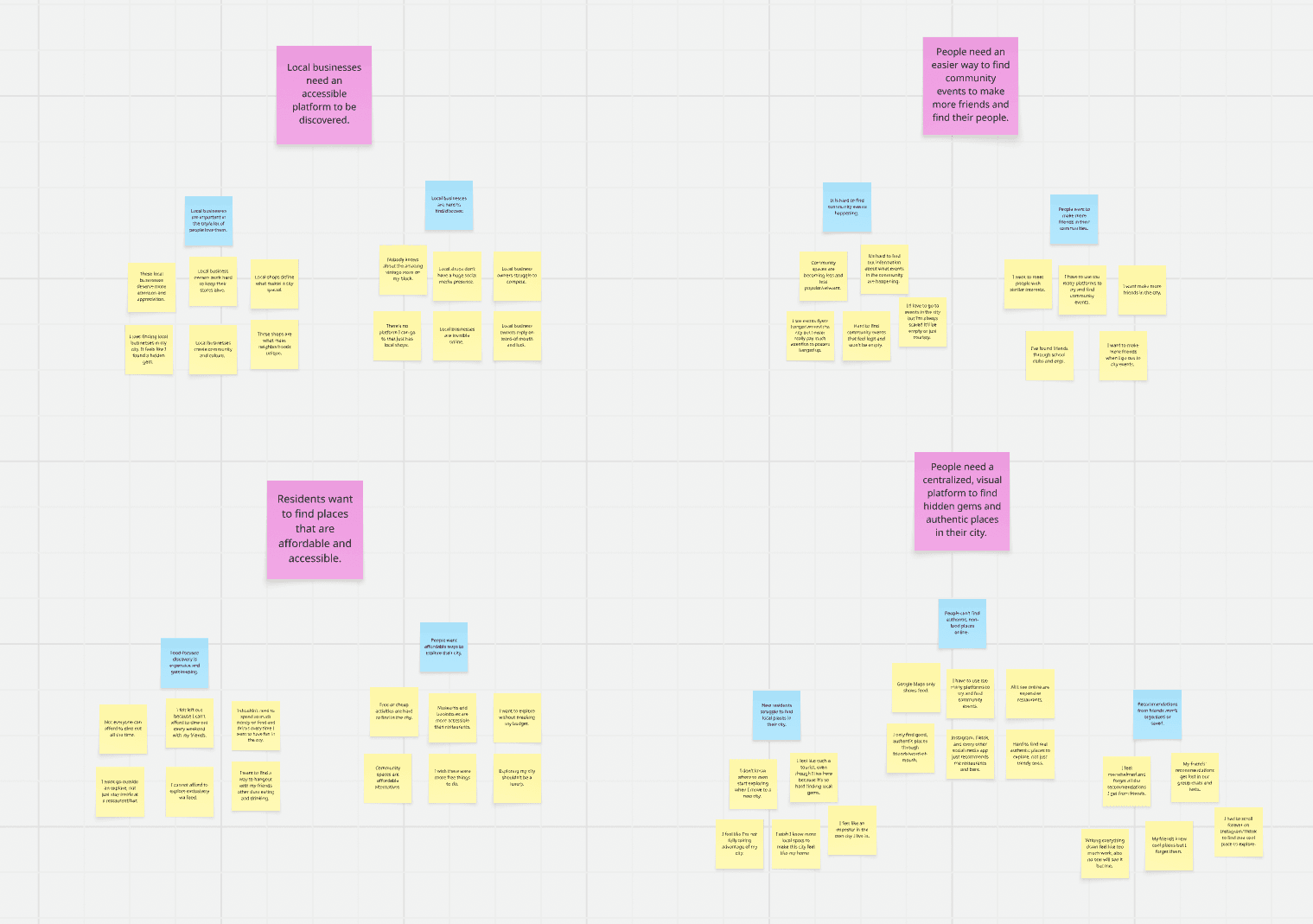
I interviewed 15 people—5 new residents, 5 long-time residents, and 5 local business owners—to understand how they discover places in the city and the barriers they face. I organized their responses into an affinity diagram and identified a huge gap.
How We Organized It:
Yellow sticky notes represent direct observations and user quotes from our interviews.
Blue sticky notes are summary labels we created to group related observations.
Pink sticky notes are the broader themes that emerged from clustering the blue labels.
Four Key Insights:
1
2
3
4
People want authentic experiences
Small businesses are hard to find
People want affordable experiences
They want to discover real, community-driven places, not algorithmic or trendy recommendations.
People care about local shops, but don't know how to find them or support them.
They struggle to compete with larger companies because there's no platform that celebrates them.
Small Businesses are important for communities
They want to explore their city without spending money every time.
The Gap & Pivot
The Gap: After interviewing residents and local business owners, a clear pattern emerged. Residents wanted authentic experiences to feel connected to their community, but couldn't find anything beyond the trendy, tourist-focused places the algorithm fed them. Local businesses provided these authentic, local experiences, but they struggle to be discovered.
The disconnect was clear: Two groups that needed each other but had no bridge to connect them.
The Pivot: Then, I realized the problem wasn't just that people needed to find cheaper, non-food related places. That was too narrow. Every time I asked interviewees about their favorite spots in the city, the answer was always a local business– a café, a bookstore, a vintage shop. It didn't matter what category. What mattered was that it was local. That's what made it feel genuine and unique.
So I pivoted. Instead of building a social app where residents just shared hidden gems with each other, I gave local businesses a voice too— the ability to create pages, post updates, and speak directly to their community. Because building community means both sides have to show up. Interviews made that clear: the places people loved most weren't just good spots— they were places where they knew the owner, understood their craft, and felt their passion for it. That connection is what made it feel real. So I built something that connected residents to owners and owners to residents. Not just a discovery app. A community.
Local businesses are what make communities special. They deserve a platform that supports them and their craft.
THE PROBLEM
People want authentic local experiences but have no way to find or connect with the local businesses that provide them.
User Personas
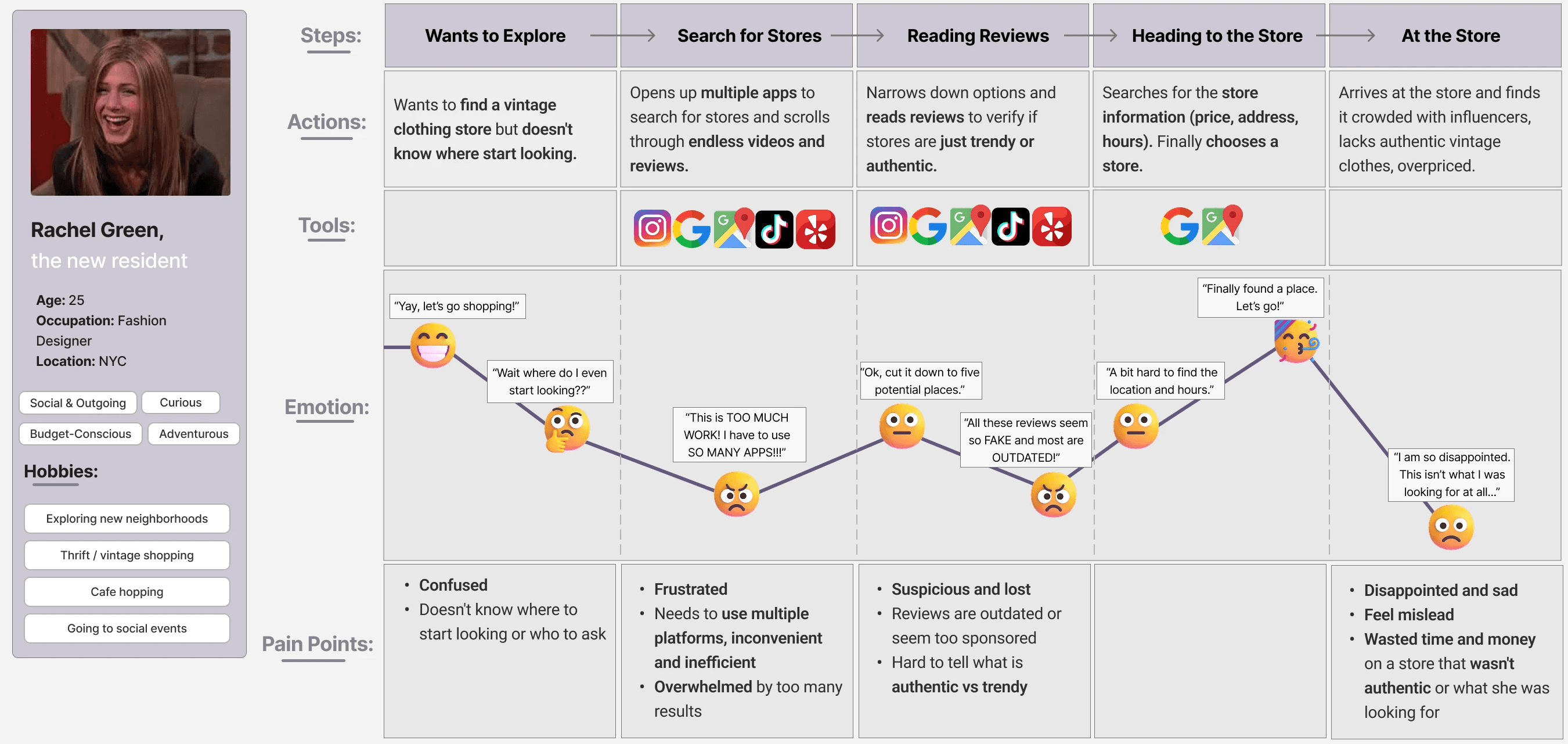
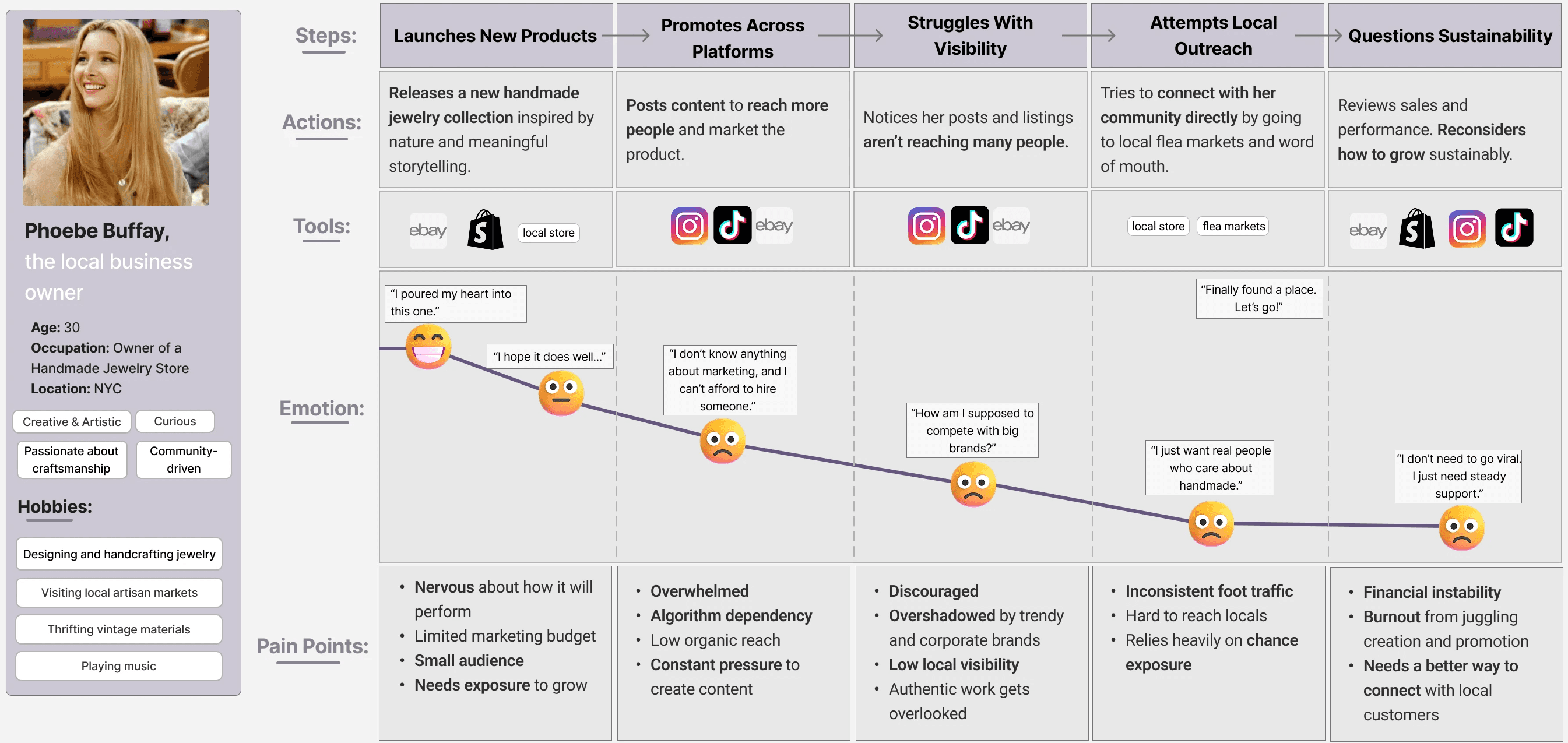
To understand the full user experience, I created detailed personas of the three core groups affected by this gap (new residents, long-time residents, and local business owners). By mapping out their emotional journeys and pain points, I identified the critical moments where our solution can help turn things around.
peek the special Friends feature👀
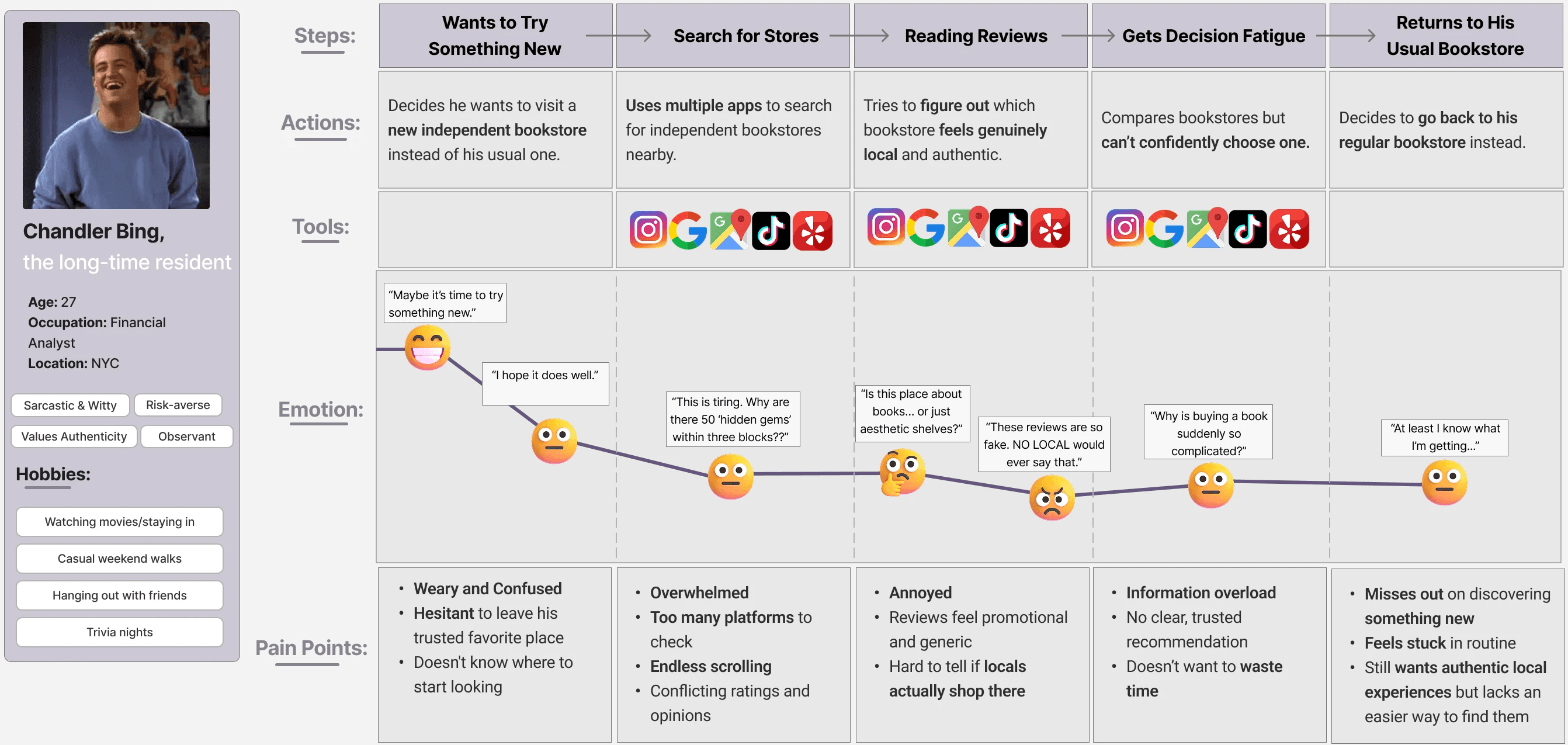
Information Fragmentation
Pain Point: Users need to jump between multiple apps (Instagram, Google Maps, TikTok, Yelp) to find stores, reviews, and hours.
Feature Needed: Unified platform with all reviews, store information, and recommendations in one place.
Authenticity Verification
Pain Point: Reviews feel fake or sponsored. Algorithms give trendy stores over authentic local gems.
Feature Needed: Community-driven feed where real people get authentic recommendations.
Discoverability Gap
Pain Point: Local businesses have a hard time garnering attention Residents can't discover local businesses beyond word-of-mouth.
Feature Needed: Direct platform connecting local residents with local businesses.
Competitive Analysis
Before diving into design, I analyzed existing platforms that help people discover places—Instagram, Google Maps, Yelp, and others—to understand the competitive landscape and pinpoint where Homemade can make a difference.
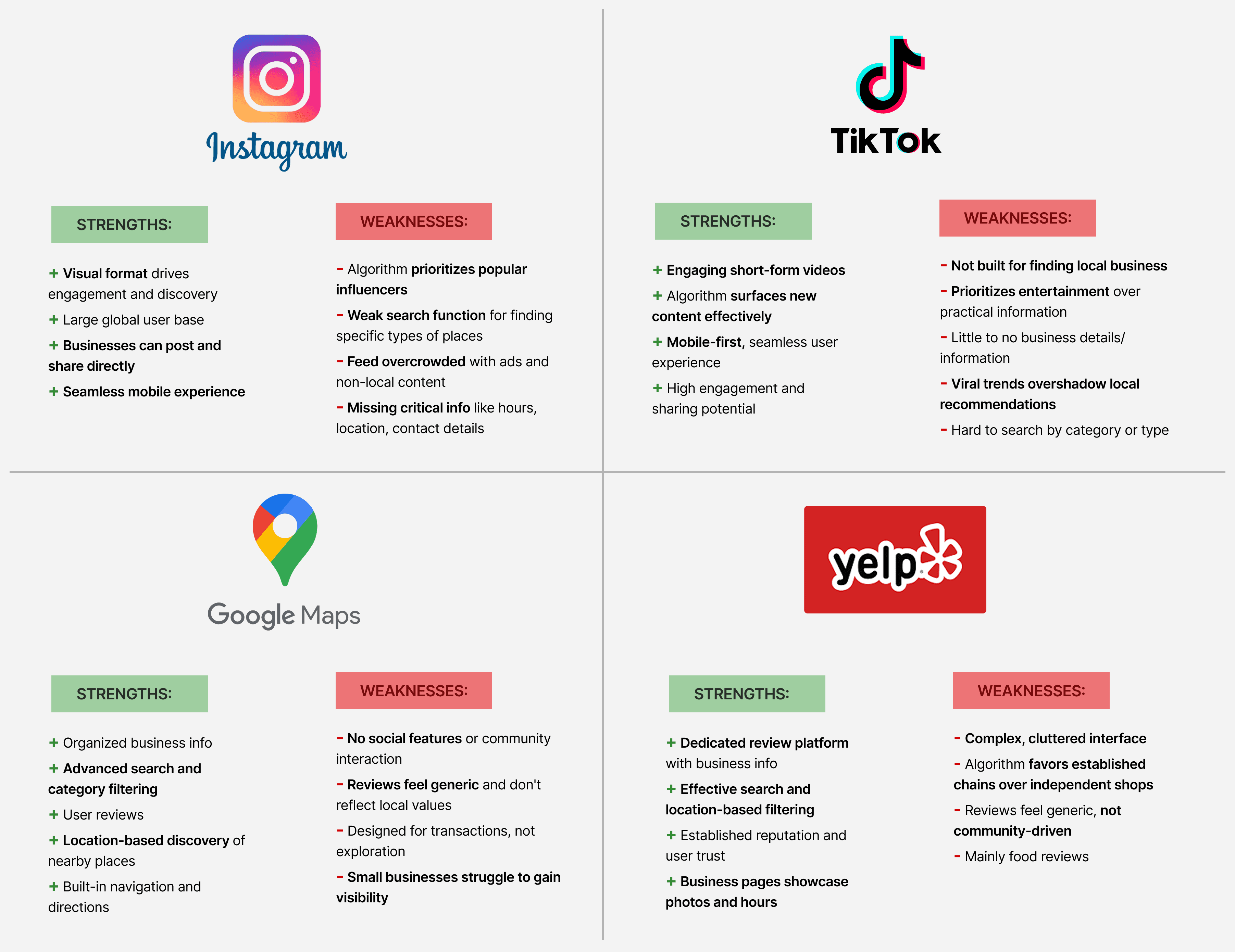
Instagram, TikTok, Google Maps, and Yelp all help people find places, but none of them were built for community. They're either algorithm-driven and popularity-biased, or transactional and generic. They connect people to places, but not to each other, or to the people behind the businesses.
That's the gap Homemade fills. Local businesses have a voice— posting, updating, and engaging directly with residents. And instead of an algorithm deciding what's worth finding, locals do.
DESIGN PROCESS
Guiding Design Principles
Before diving into design, I established guiding principles to ensure my solution stayed true to the core problem and user needs. These principles kept me focused throughout the design process.
Give Businesses a Voice
Local businesses aren't just listings. They're living, breathing parts of the community. Give them the tools to share their craft, story, and connect them directly with residents.
Community-First
Homemade is built around people, not algorithms. Every design decision should bring residents and local businesses closer together.
Exploring your city should feel easy and welcoming for everyone— not just for people who can afford to keep up with trends.
Simple and Accessible
Authentic Discovery
Finding a new place should feel like a recommendation from a friend, not a sponsored result. Real experiences from real people, not curated content.
User Flow
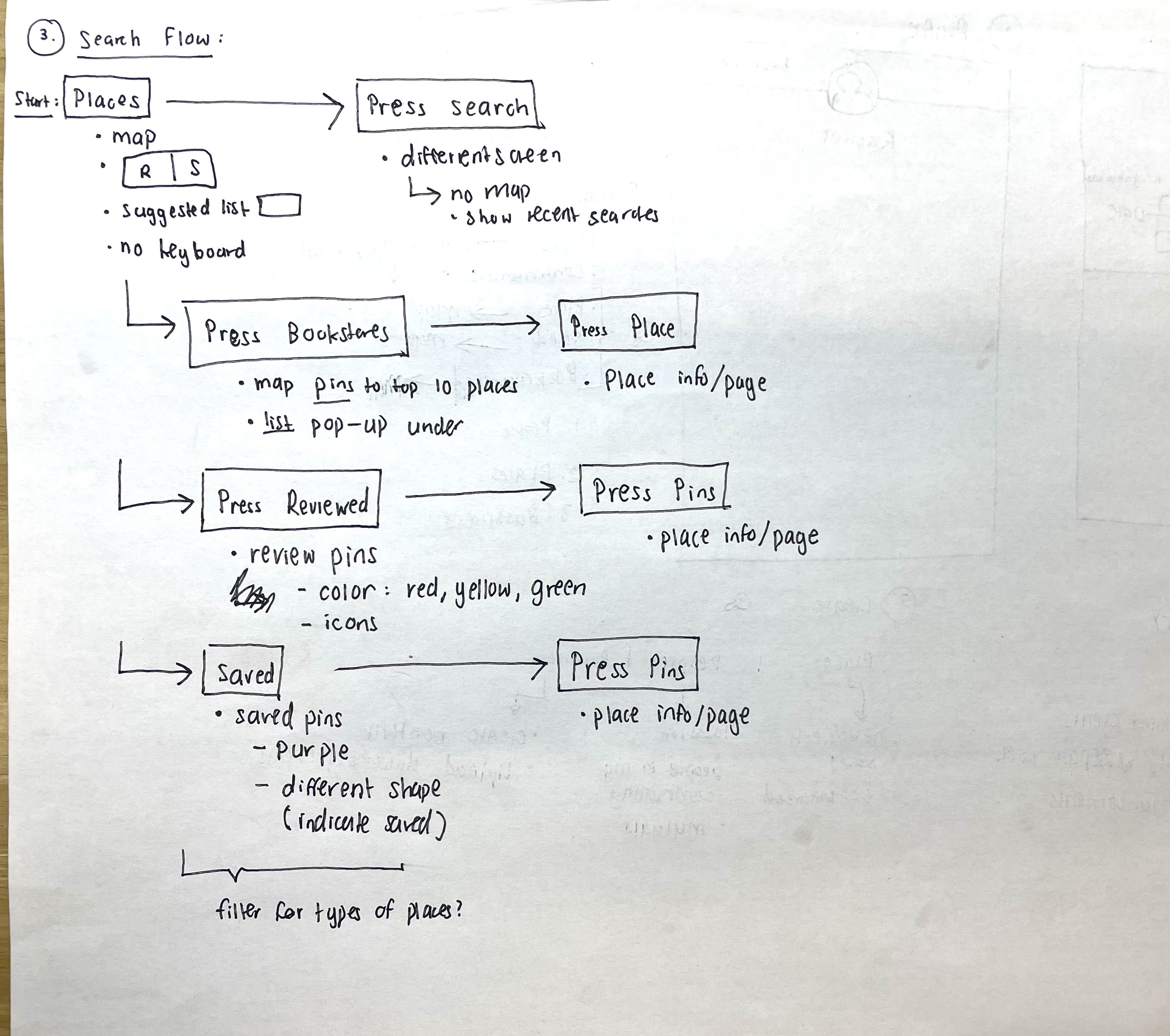
Before putting anything on the screen, I mapped out two separate user flows to reflect the two distinct user experiences within Homemade: the resident and the business owner.
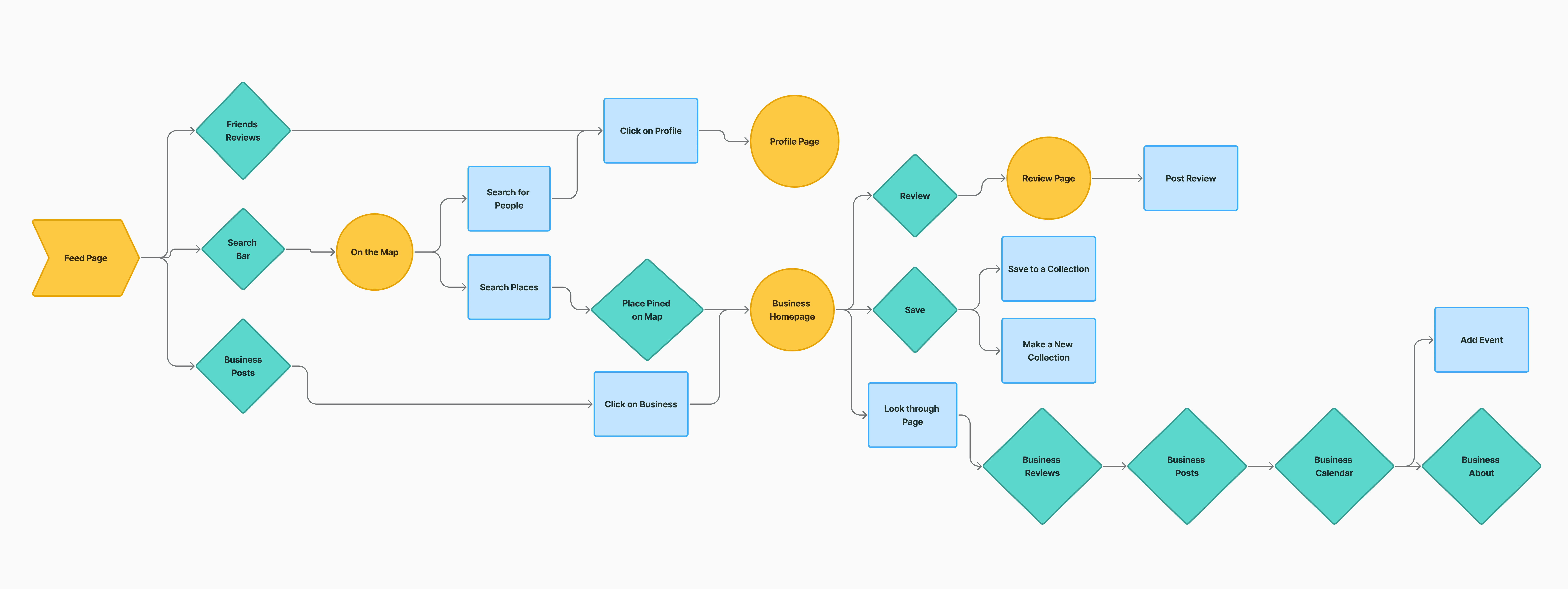
The Resident flow starts from the feed, where they're met with the two core purposes of the app: find businesses and find people. They can browse posts from friends and businesses they follow to stay connected to their community, and discover new businesses through upcoming events in their neighborhood or from friends.
The business page is the heart of the resident experience. Reviews, saves, and all business information live in one place, so the user does not have to jump between pages or use a third-party app to get more information about businesses. The same goes for finding people. A friend's profile shows their personality and vibe all in one place. The flow is designed to help users find businesses easily and organically through their community, not algorithms.
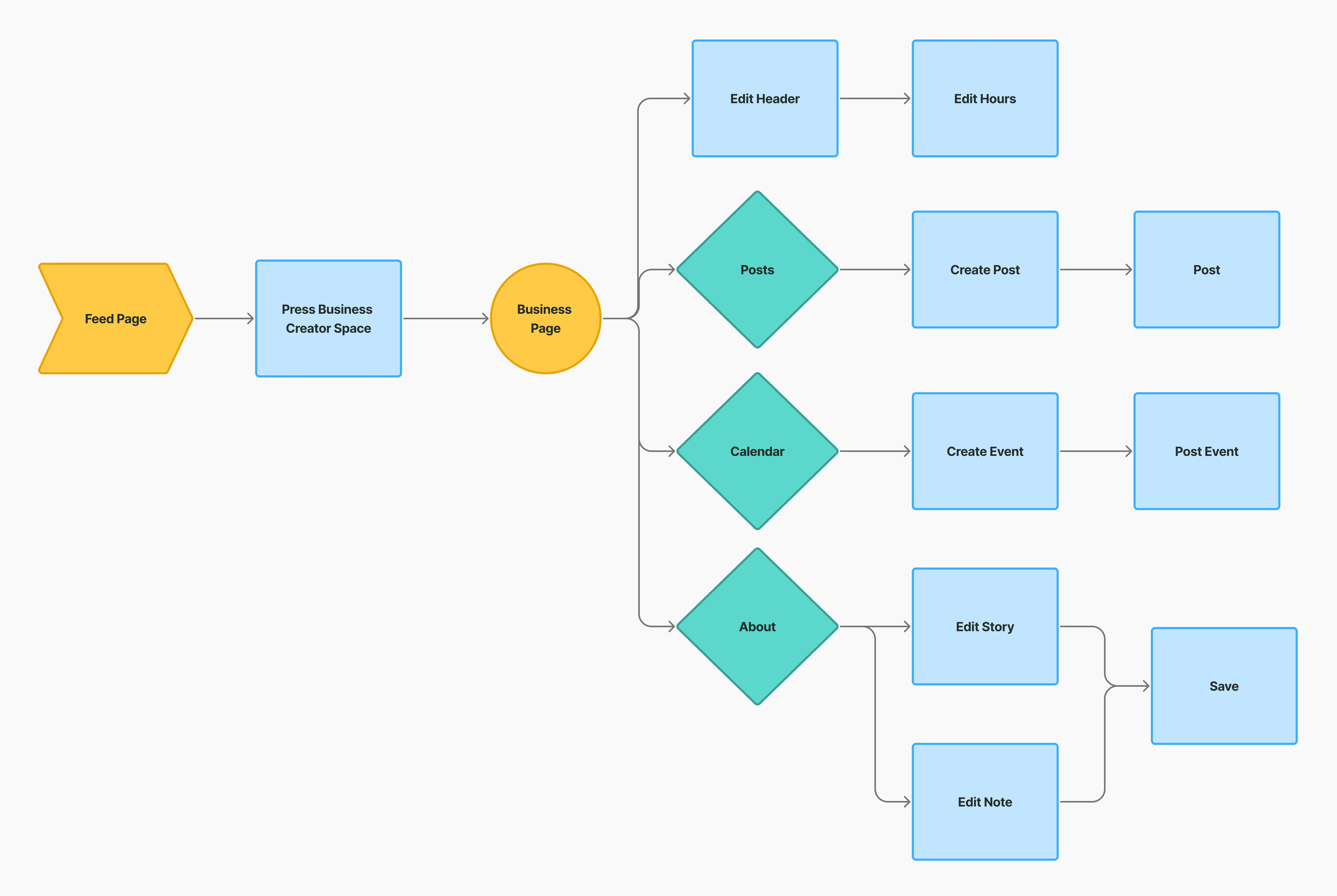
The Business Owner flow starts from the feed, where owners then navigate to the business creator space— this is the center of the business experience. From this one page, businesses can customize their profile, edit business information, and create posts to speak directly with residents.
The goal of the flow was to make it simple and easy for businesses to build their presence without having to navigate through and manage multiple pages. Every touchpoint is designed to give businesses creative freedom to build a page that feels personal and unique to them. Not a rigid, cookie-cutter, static listing that looks like every other business because every local business has a unique story to tell, so I designed a space for them to tell it.
Low-fi Prototypes
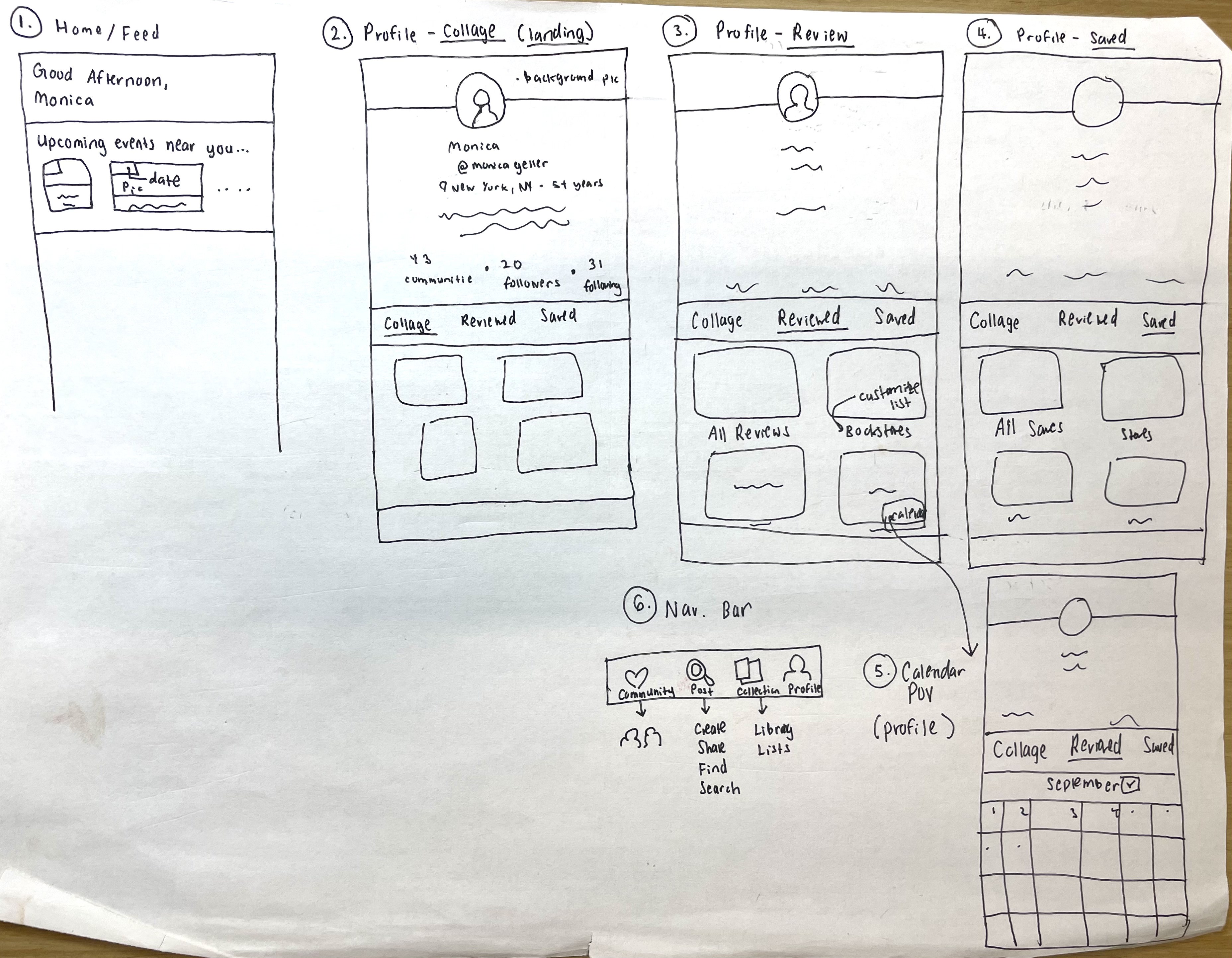
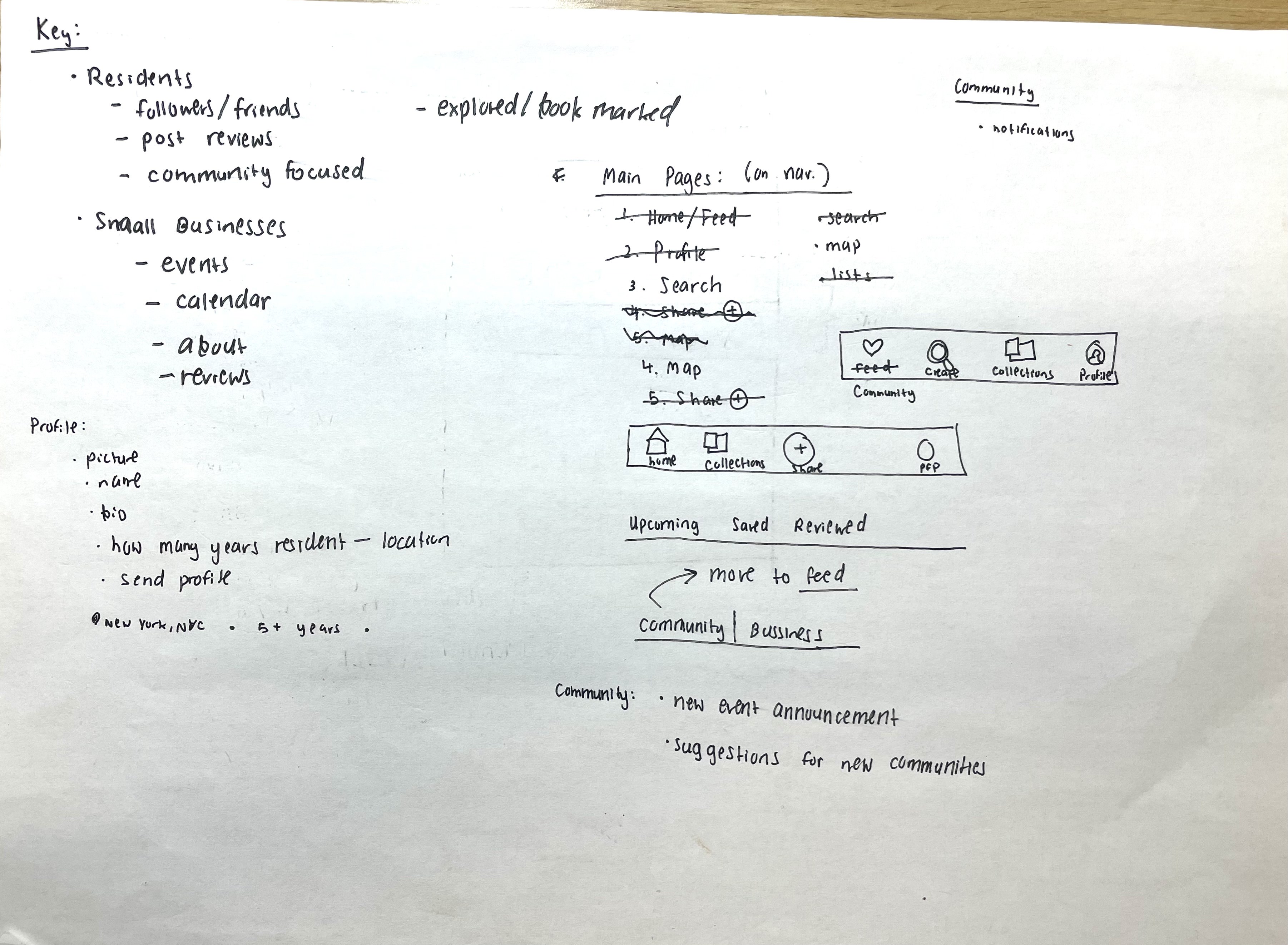
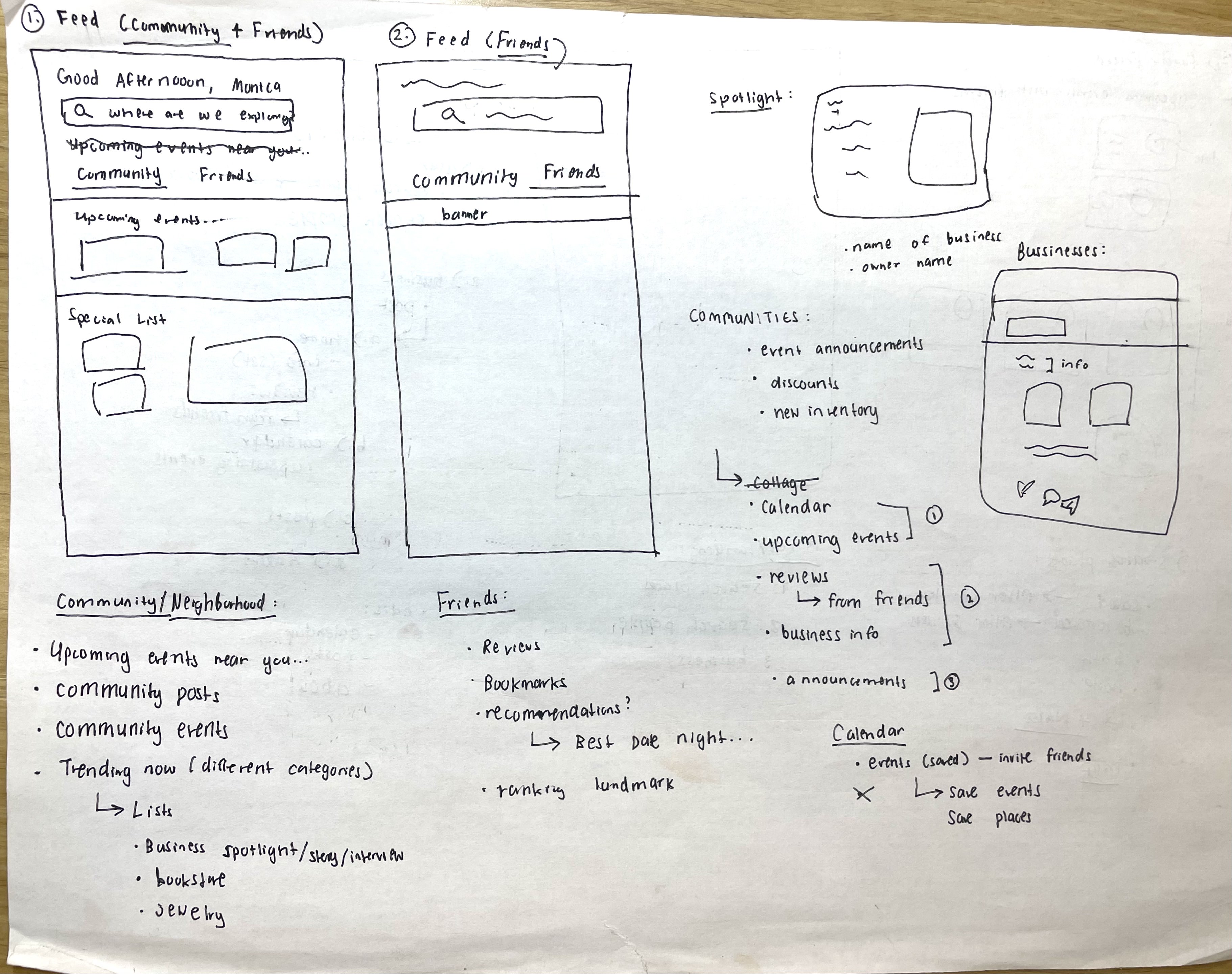
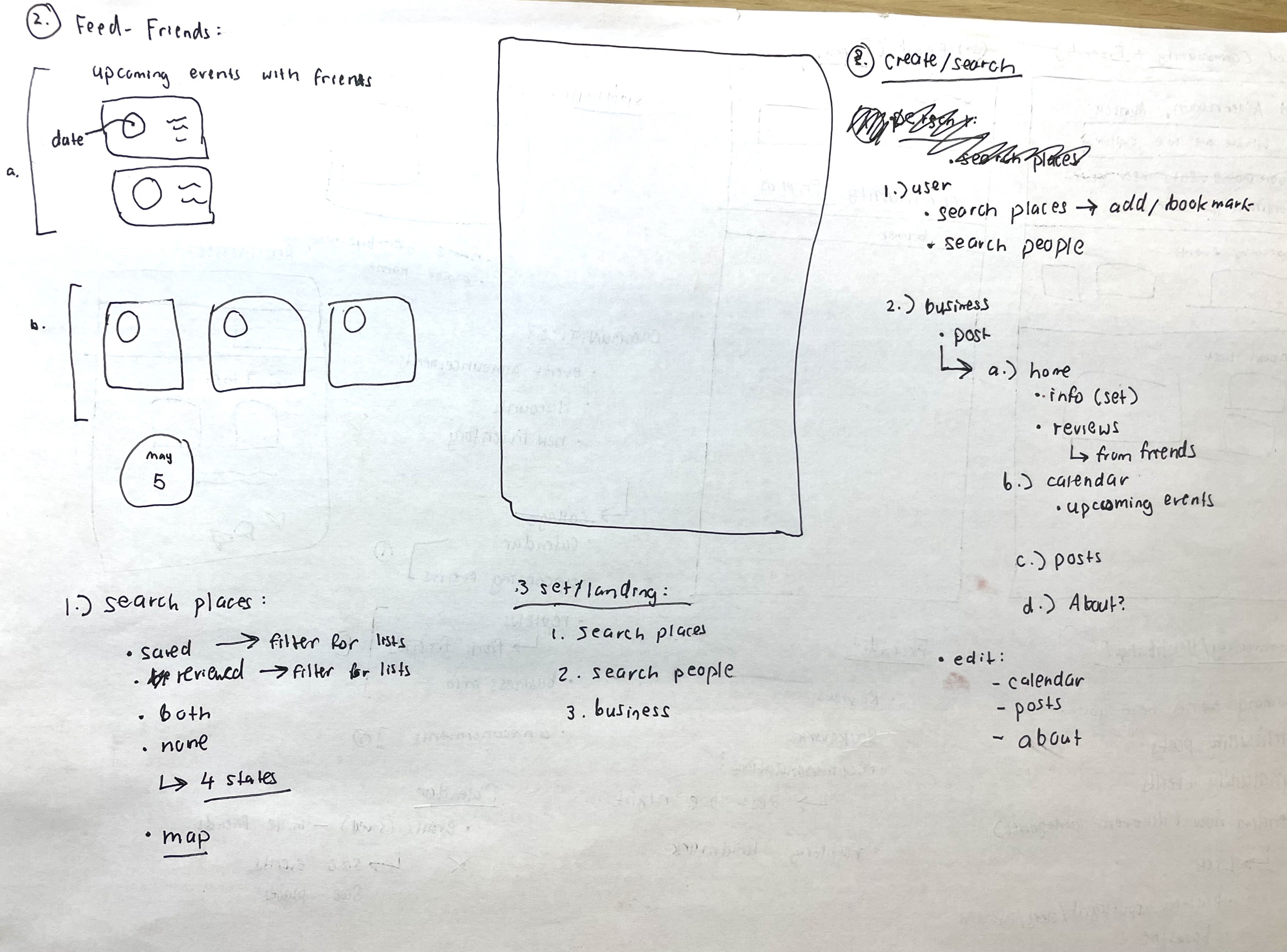
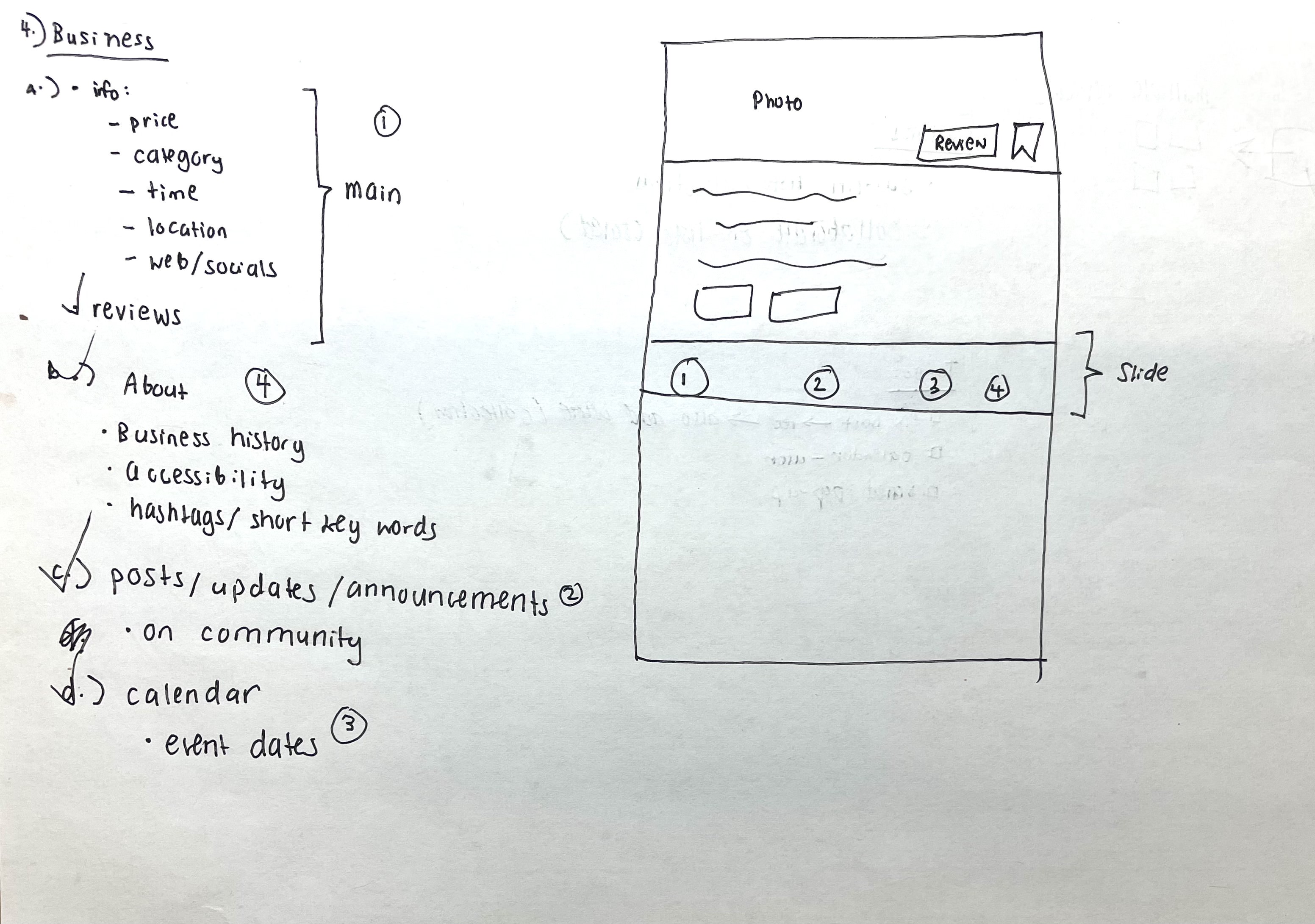
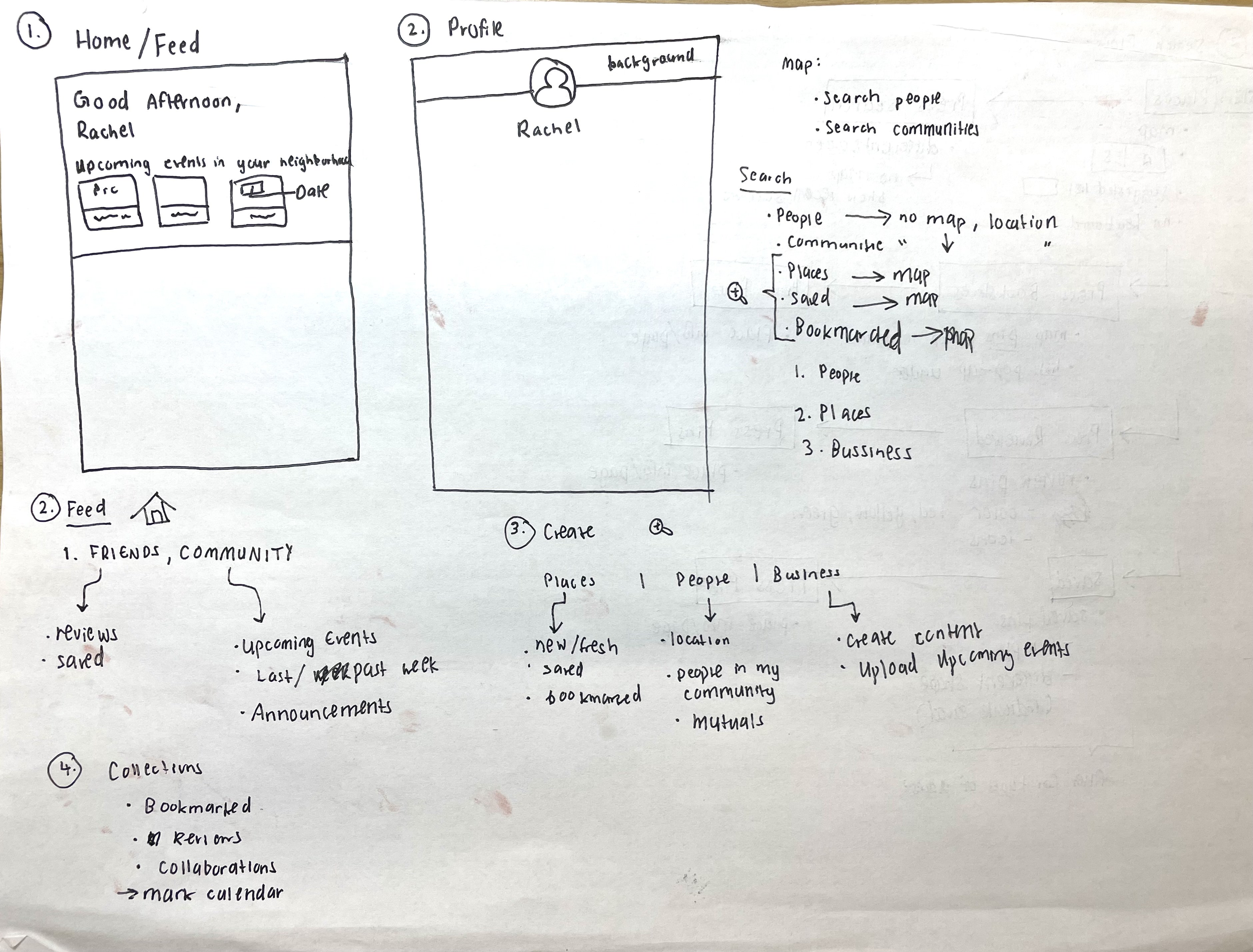
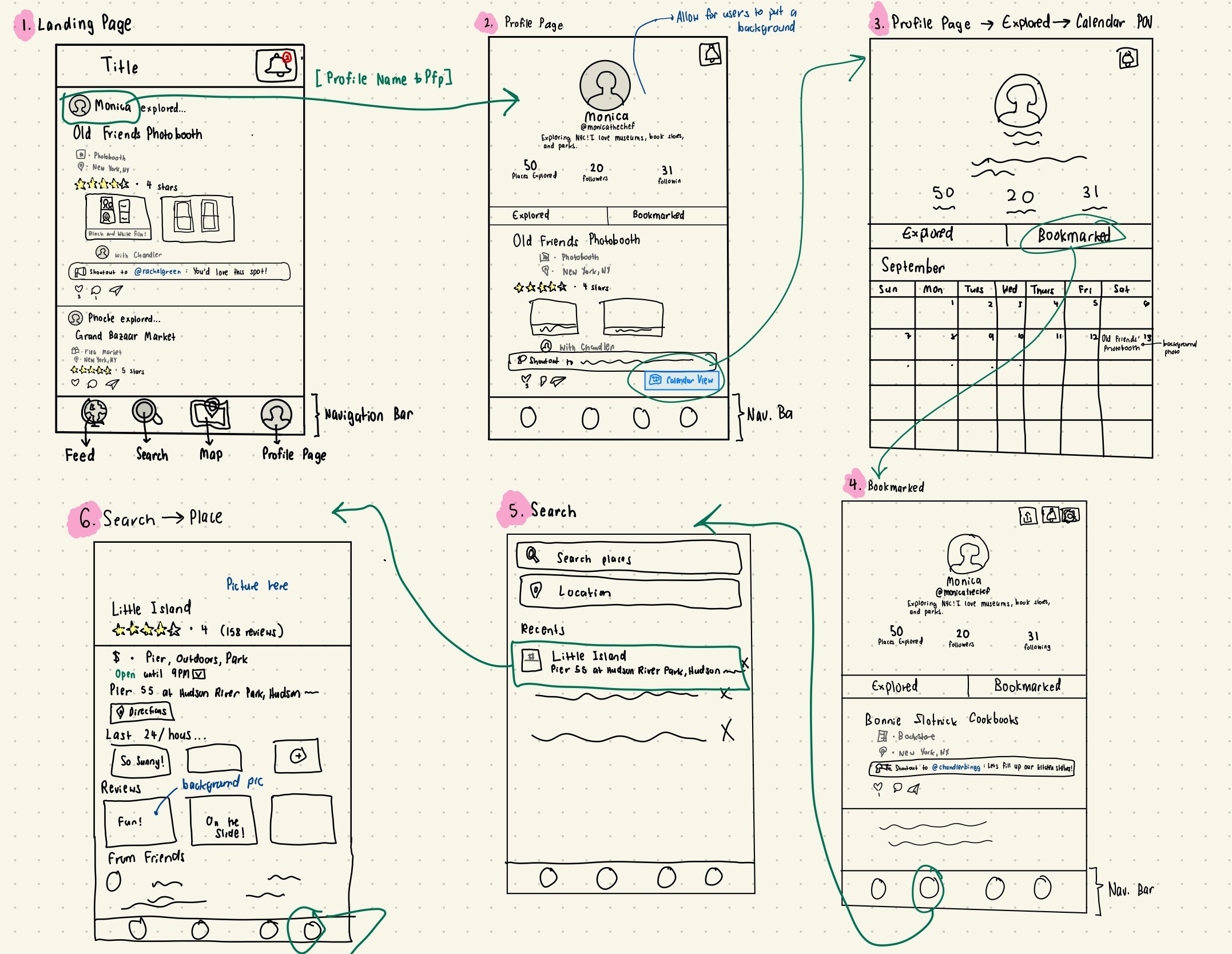
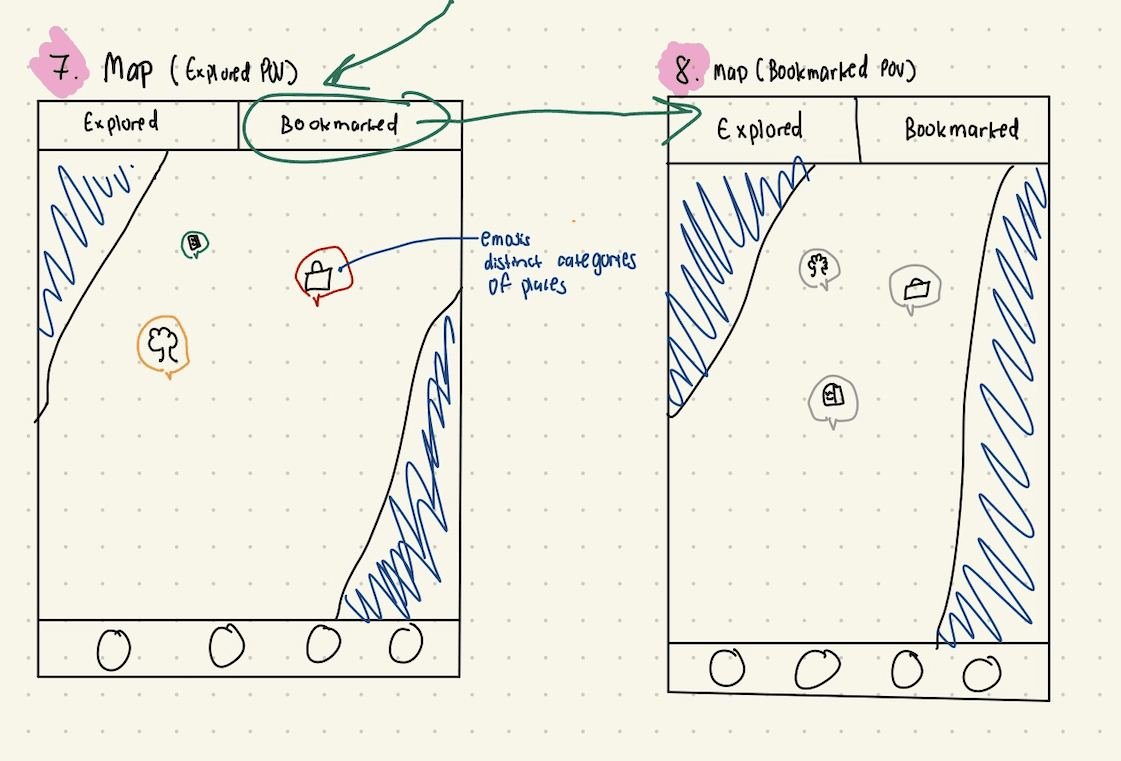
With the user flows mapped out, I took out my pen and paper and started sketching out layouts. Before designing wireframes on Figma, I wanted to freely draw rough sketches of my ideas to see what layouts felt intuitive without getting stuck on little details too early.
I sketched out different layouts and structures for core screens— the feed, profile, search, map, and business pages. These sketches went through multiple iterations, and a lot of what I explored here ended up looking very different from the final product. But that was the point. Low-fi is where I could take risks and explore different layout ideas.
I knew I had a lot of features and pages to implement, so I ranked the importance of each feature per page. My goal was to find balance— make the pages feel complete without overwhelming the user with too many features, and connected without creating click fatigue for the user by making them go to multiple pages to get a task done. I questioned and tested the experience of each page to figure out what made the app feel intuitive, not just functional.
User Testing & Iteration
After sketching out my layouts, I moved into Figma and built a mid-fi prototype. Then, I did user testing with five residents and three local business owners. I got feedback on what felt intuitive and what didn't, and made iterations to my design.
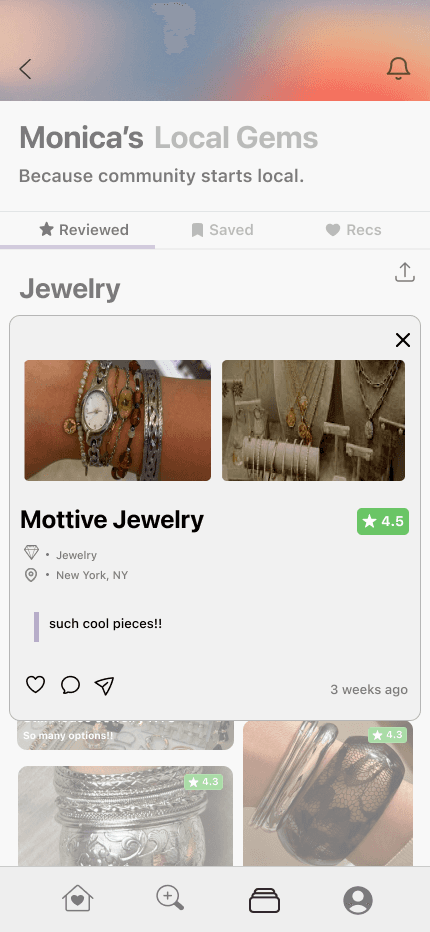
Users found it unintuitive to have to click a separate Collections button to access their saved and reviewed places. The extra step broke the flow.
Feedback:
I redesigned the Reviewed and Saved pages to make the collections interface the landing page. From there, users can select specific collections to go through.
Change:
"I didn't even notice the Collections button at the bottom— I just thought I had to keep scrolling to find the review."
💬
"This is a lot more organized. Makes me feel more excited to create more collections."
💬
Navigation became faster and more intuitive. Having collections as the landing interface motivated users to create more collections and keep their profiles active. It also made scanning other users' profiles easier— you can quickly spot shared interests and places to connect over.
Impact:
Clean and less
crowded review
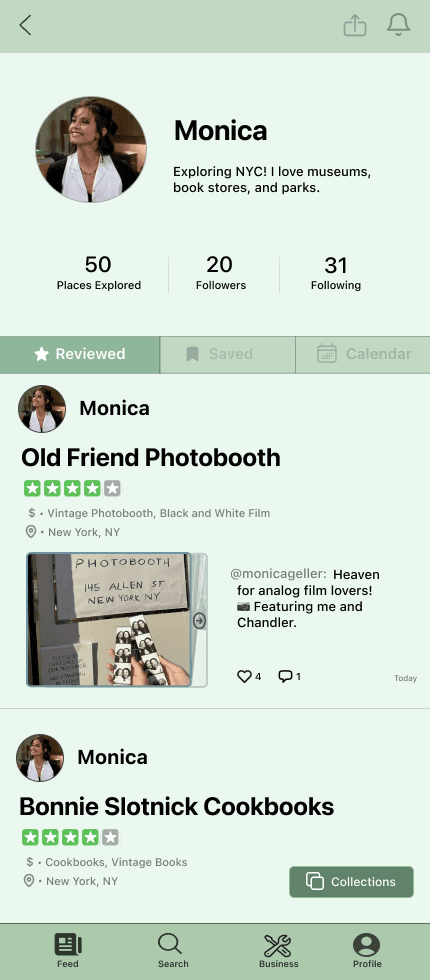
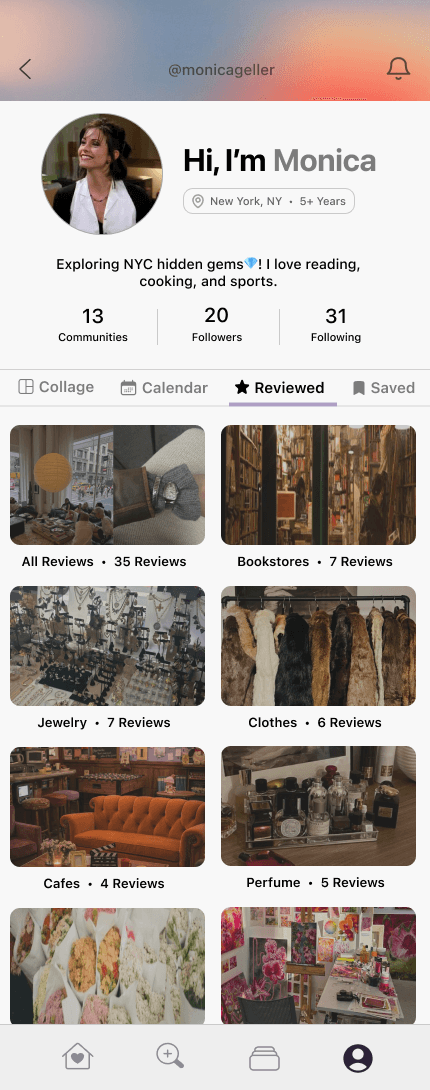
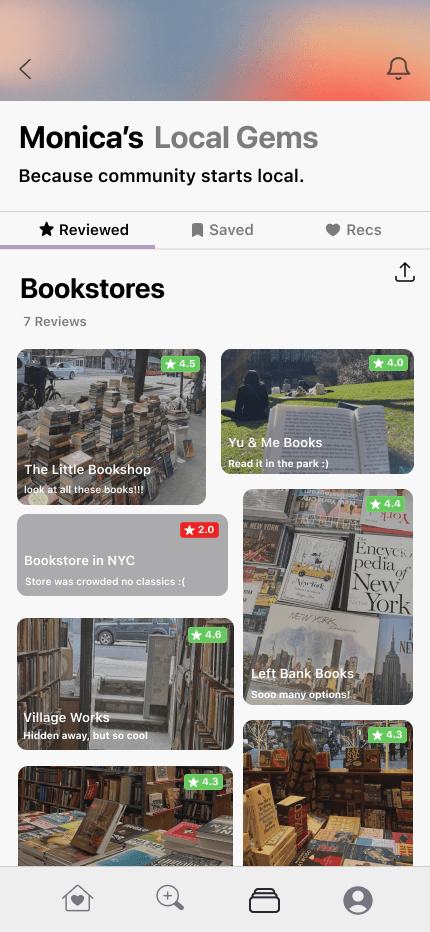
Preview of place name, note, and rating. Quick and easy scan
Hard to notice button
at the bottom
Review looks scattered
and crowded
Looks more organized
Easier to find past
reviews/saves
Easy and intuitive flow
Old
New
Iteration 1
Profile Page: Organize by Collections
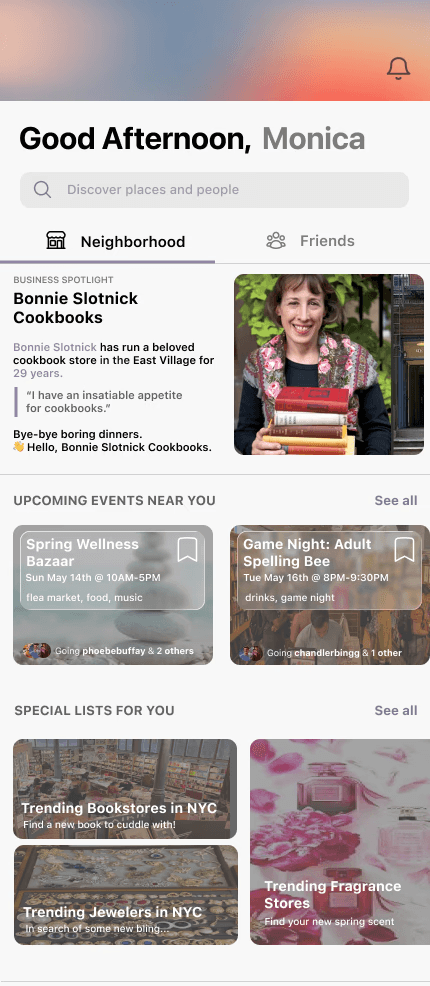
Same page— toggle to get
to diff feeds— easy and
simple
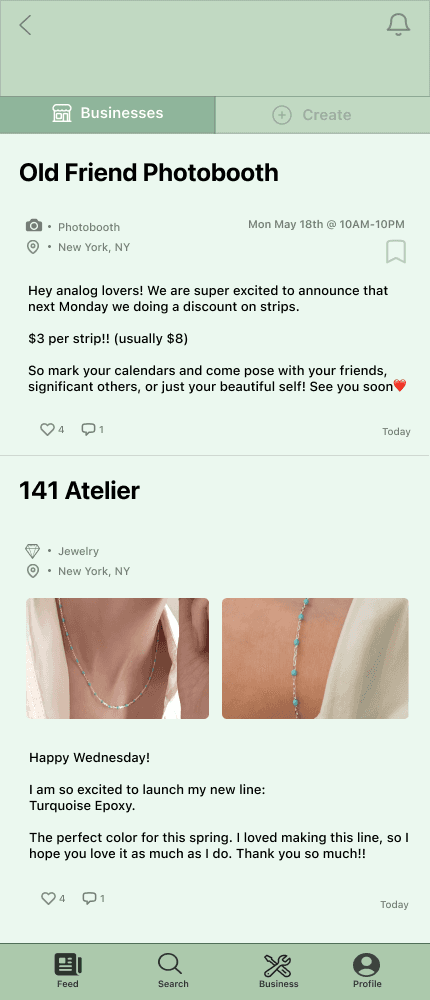
Find upcoming events
conveniently
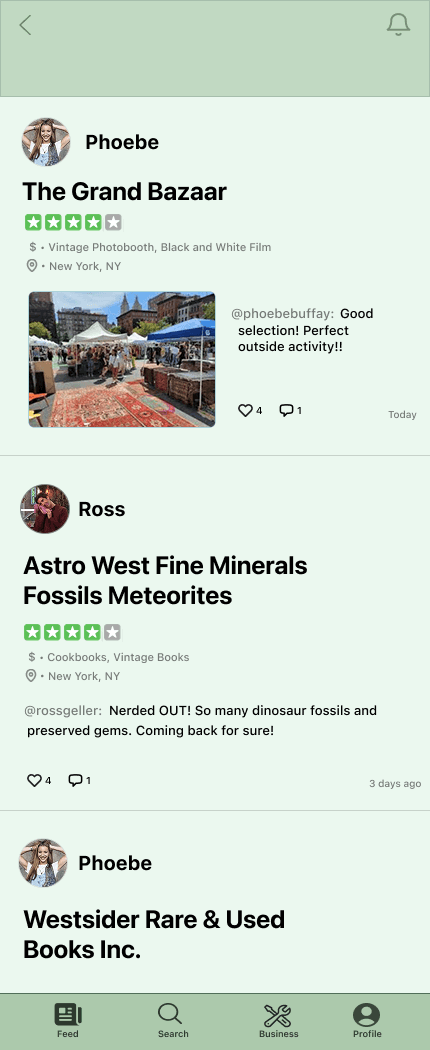
Navigating between
two pages is inconvenient
Most users do not have
a business page to maintain—
risk that not many users will go
to business page
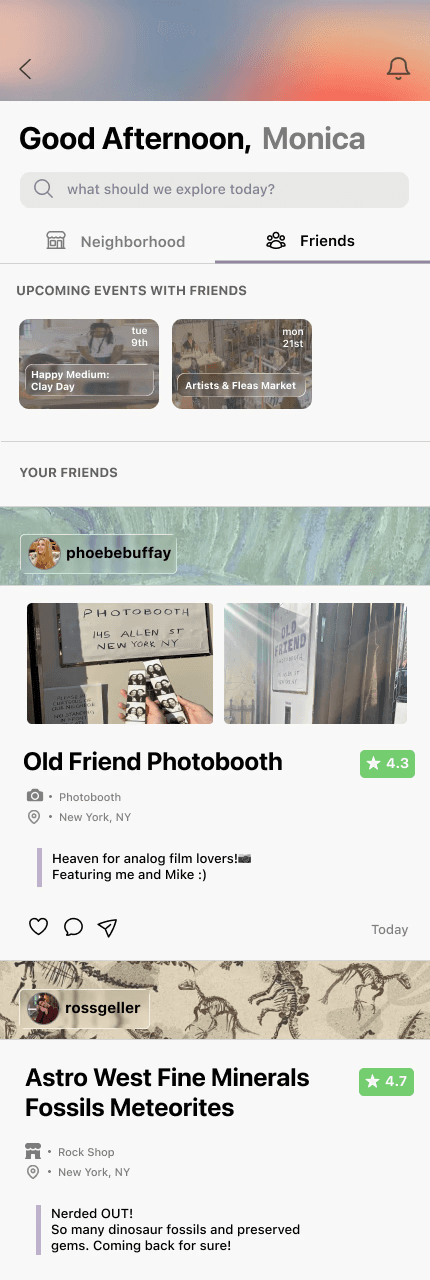
Switch between posts
from businesses and
friends smoothly
Old
New
Iteration 2
Feed Page: Combine Neighborhood & Friends
Users found it inconvenient to switch between two feeds for business posts and friends' posts. It broke the flow and made the app feel disconnected.
Feedback:
I combined both into a single feed with two tabs, so users can toggle between what's happening in their neighborhood and their friends, all from one place.
Change:
"Barely went to the business feed because it was all the way on a different page."
💬
"This is a lot easier to catch up with everything all in one place."
💬
Keeping both on one page reinforces the idea that Homemade is all about community. Businesses and people exist together the way they do in a community. A friend's review and a business post can live side by side and inform each other, making finding new events and places more organic and authentic.
Impact:
Old
New
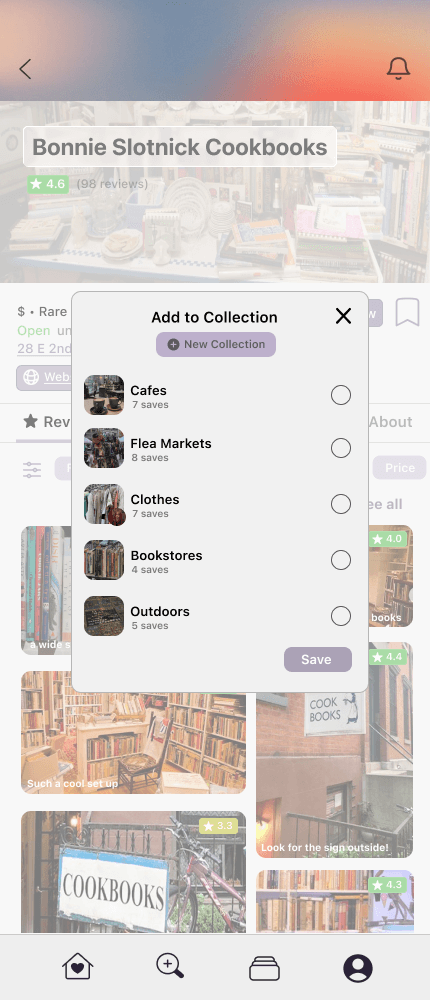
SAVE TO ONE COLLECTION
Click bookmark
Selection section
Saved!
SAVE TO 1< ONE COLLECTION
Click bookmark
Press Hold
Select all desired collections
Press Done
Saved!
Save at the bottom—
annoying to have to scroll
down and click everytime
Checking off small circles
— harder to navigate vs.
just clicking on boxes
Iteration 3
Save/Hold Feature
Users found it annoying to have to click a save button every single time. It interrupted the flow, especially when they were browsing and saving multiple places.
Feedback:
I redesigned the saving feature to where a single click saves to one collection instantly. For the less common case of saving to multiple collections, press hold to say "hold on until I am done choosing collections." No unnecessary steps for the most common case.
Change:
"It's annoying to have to click save every single time, especially when I'm just browsing."
💬
"This makes it so easy to save places quicker. The holding feature is fun."
💬
Through research, I found that over 80% of the time, users were saving to just one collection— making them click a save button every time for something so common was unnecessary friction. The flow now matches real user behavior. It motivated users to save multiple places at once because of how much faster it was.
Impact:
FINAL DESIGNS (TA-DA!)
🪄
Collections Page
REVIEWED & SAVED TABS
See all the collections you've created for your reviewed and saved places.
Formatted in a clean collage layout. Easy to navigate through different collections.
Press reviews to see the full review and saved places to go to the place's page.
Planning a trip to Brooklyn? You and your friend both love thrifting? Make your saved collection collaborative, so you and your friend can share places you both want to go together!
COLLAB ON SAVED COLLECTIONS
REC FROM FRIENDS
UPCOMING EVENTS & RECS
Only trust recs from friends? See what places your friends think you'd love! Because they know you best.
Ready to explore something new? Find events happening near you or new places to explore recommended by the community.
✋ Simple & Accessible
🏠 Community-First
🔍 Authentic Discovery
INTENTIONAL WORDING
Made the reviews more human-centered. Picking careful word choices to allow the user to feel happy reviewing.
REC TO FRIEND
Know someone who would love this place? Recommend it to them!
NOTE FROM OWNER(S)
A personal note from the owners after you visit. Because your support does does go unseen!
COLLAB WITH FRIEND
Collaborate with your friends on saved lists to plan your next group hangout or share your gate-kept spots with each other!
Review Page
Collaborate
Business Pages
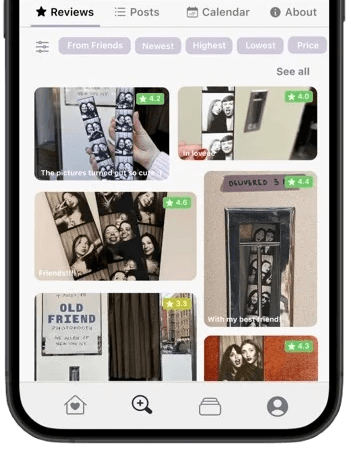
REVIEWS
MAP LANDING
Business landing pages are pinned on the map, so users can easily identify neighborhoods/locations.
Ratings with photos are favored toward the top to help users visualize the place. Many filter options for users to pinpoint their needs. Rating shown in the corner for quick scanning.
POSTS
Keep up with new announcements of special launches, deals, and events through the business's posts.
CALENDAR
ABOUT
Look at business's calendars to see what events spark your interest and add them to your calendar.
Read their story and learn about their craft. Makes the experience more meaningful.
Also, see what services and accessibility they offer to support inclusivity and consideration for all.
Business Profile
💼 Support Businesses
🤝 Trust & Transparency
🏠 Community-First
♾️ Inclusive Design
POSTS
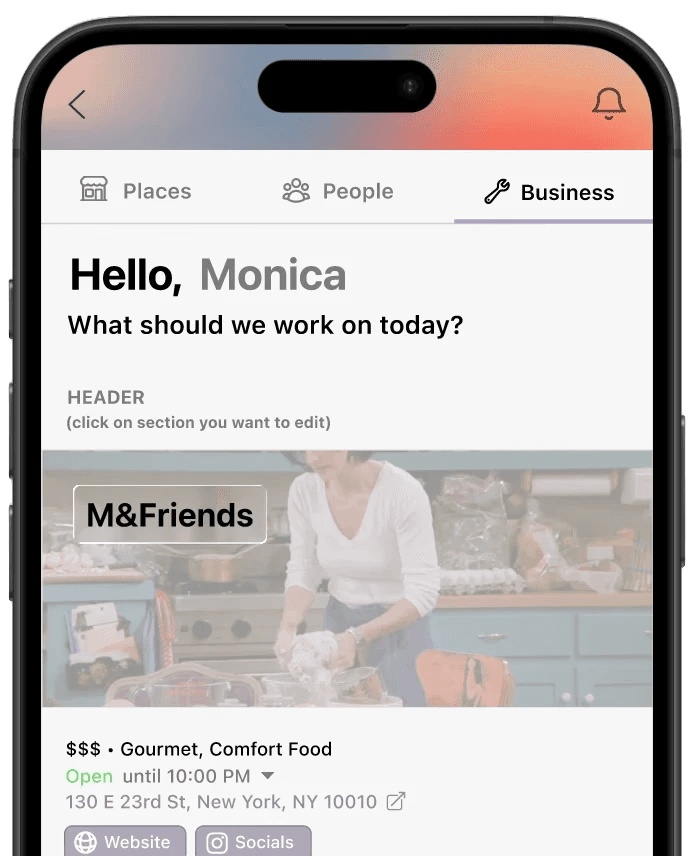
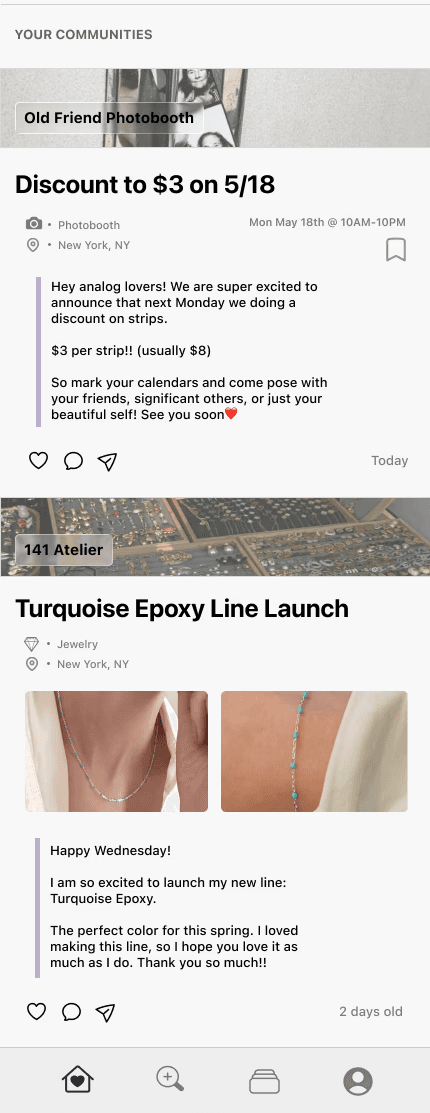
Post events, special launches, announcements, or anything you'd love to share with your customers. Directly speak with customers, create a community.
CALENDAR
ABOUT
Fill up your calendar with events that month or launches, so your customers can save them in their calendar!
Share your story. Tell the community about your craft and passion. Let the user know why you love it so much and why they should too.
HEADER
Keep hours, location, and general information up-to-date to always correctly inform customers.
Business Creator Space
Profile Page & Personalized Designs
REVIEWED & SAVED
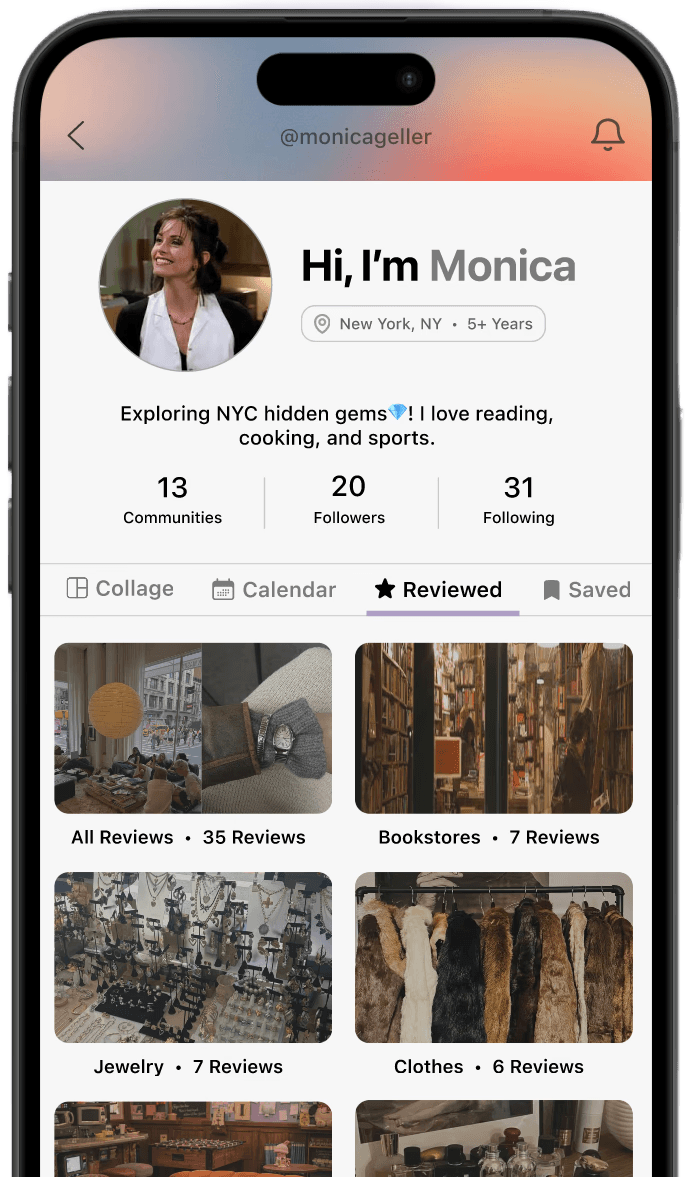
HUMAN INTRODUCTIONS
No cold social media introductions that just spam follower counts and pictures.
Instead of just a username and bio, start with a human introduction — "Hi, I'm..."
Members can add their city and how long they've lived there, so you know if a recommendation is coming from a longtime local or someone brand new.
See if you've been to the same places as someone else or if there's somewhere you both want to go. Find something shared and connect over it.
🏠 Community-First
🔍 Authentic Discovery
💬 Social Proof
COLLAGE
CALENDAR
Automatically builds from a user's photo reviews, giving others an instant feel for their personality and taste. Also motivates the user to use photos in reviews, which creates more impactful reviews.
Fill up your calendar with community events. See if others are going to the same event as you and go together!
CUSTOM BANNER
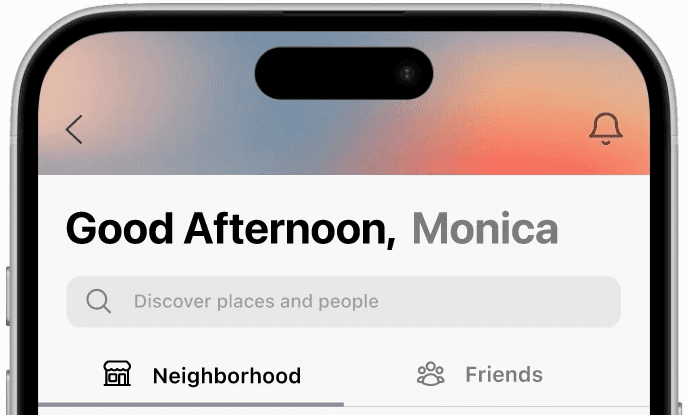
WARM GREETINGS
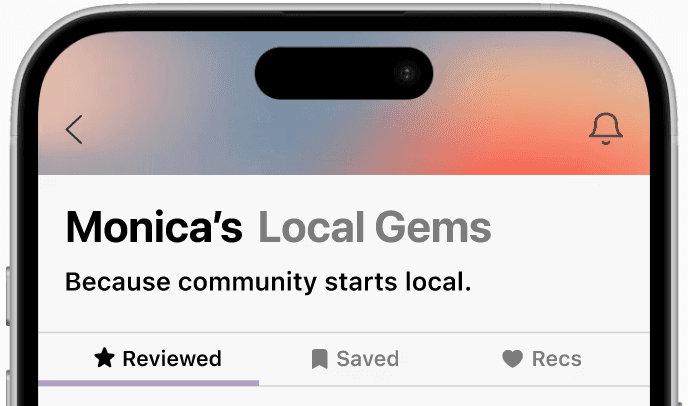
Members can customize their profile banner so the app feels custom to them and when they appear in feeds their profile feels like them.
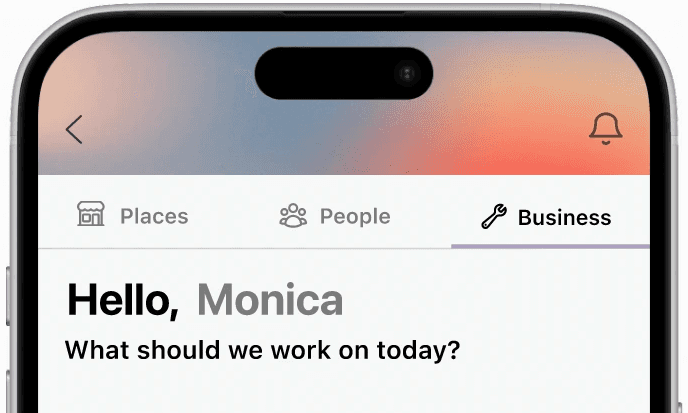
Every screen warmly greets the user. Because building community starts with making people feel like they belong. Human-centered greetings.
Feed
TOGGLE BAR
SEARCH BAR
Already have a place in mind? Go directly to the search page to find it.
Easily switch between different pages by pressing the tabs from the bar.
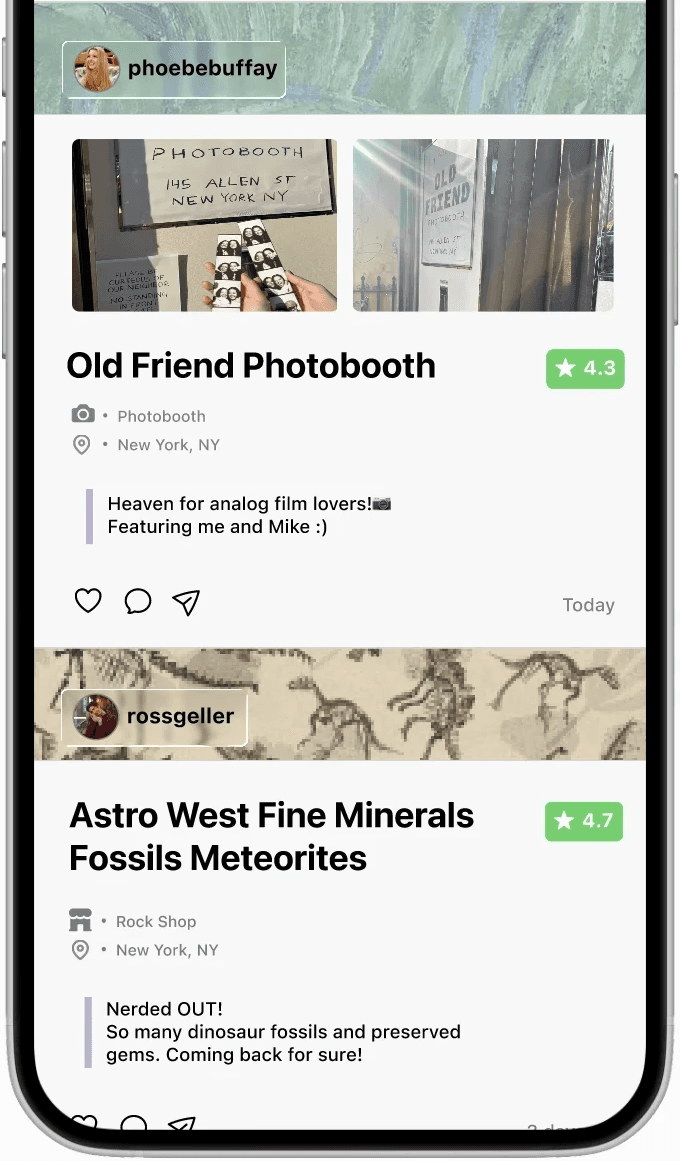
Spotlighting a small business in your area every week to share their story to the community!
See posts from your favorite businesses to see their new launches or exciting announcements.
See what your friends are up to and maybe find a new place to explore!
BUSINESS SPOTLIGHT
POSTS
UPCOMING EVENTS
REC LISTS
Find events near you! See what friends are going to, save the events, and go together.
Need help finding places to explore? Go through your recommendation lists curated by your community.
💼 Support Businesses
🏠 Community-First
🔍 Authentic Discovery
💬 Social Proof
✋ Simple & Accessible
Map Page
REVIEWED & SAVED BAR
Want to see what's close? Press Saved to see places you want to try near you.
Want to retry something? Pressed Reviewed to see what you've tried near you.
See posts from your favorite businesses to see their new launches or exciting announcements.
See what your friends are up to and maybe find a new place to explore!
POSTS
UPCOMING EVENTS
REC LISTS
Find events near you! See what friends are going to, save the events, and go together.
Need help finding places to explore? Go through your recommendation lists curated by your community.
🔍 Authentic Discovery
💬 Social Proof
✋ Simple & Accessible
REFLECTIONS
1
2
3
4
Fall in love with the problem, not the solution
Design for humans, not for the feed
Test early, Iterate often
I started convinced the problem was about food and price. It wasn't. Through real research and interviews, I found the deeper issue — people felt disconnected from their city and the community around them. Letting go of my original solution and following the research led to a much more meaningful product.
Adding small details like warm greetings and personal introductions made a bigger difference than I expected. During testing, users lit up at those moments — they said the app felt good to open. The small human details are what make people actually want to come back.
Design with intention, not just aesthetics
Waiting until later in the process to test meant some of my early design decisions needed more reworking than necessary. Next time I'd get my ideas in front of real users sooner and let feedback shape the direction earlier.
Every feature needs a purpose and every button should earn its place. Good design isn't about looking good — it's about making every decision count.
BIGG thank you to the inspiration of this project… my grandma! She is the craftiest person I know and has run many small businesses throughout the years, from homemade felt flowers to her yummy homemade dishes. Seeing her run these small businesses, I saw how they brought people together and built a community. My grandma always told me that the best part of creating these small businesses is that you also create small circles within them. You allow people to feel seen and connect with others they relate to. Find places you love to find people you love.
I thought of these stories and people I'd meet from my grandma as I build Homemade. I made sure to create the platform to best support owners and create a safe space for users to find the places they'd love. I also included many of my favorite small businesses in the app, so check them out if you are in NYC!
Thank you to all the small businesses that helped me shape my product during research, and all the residents!
And thank you to anyone who stayed this far to read. ☺
MOTIVATION & THANK YOU!